AI + AR
Design Studio
A design created by chatting with AI and tried on the body in augmented reality. The client approves the design.
Approved design becomes a work order
Design Studio by BLAKK · AI + AR
Your clients create their design by chatting with AI, try it on their body at real size and approve it with a signature. Your studio gets everything ready to quote, take the deposit and tattoo. For tattoo, piercing and cover-up.
45 days free · no credit card · clients don’t need to install anything
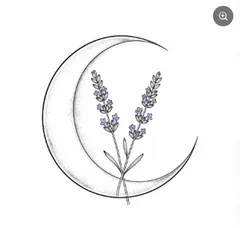
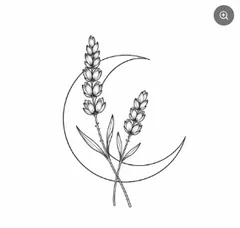
I created 4 variations. Here are the first two:
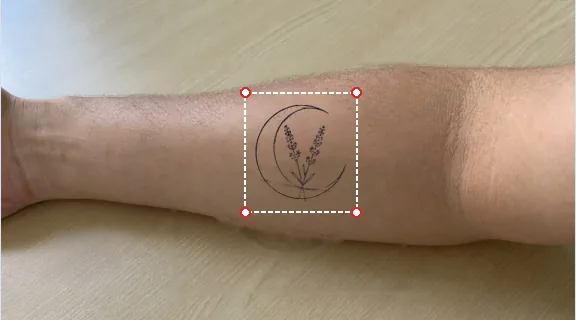
Open the camera and see it at real size:
No more swapping references back and forth on WhatsApp, no redrawing five times, no quotes lost in the chat.
Through your studio’s link or at the front desk. They describe the idea by text, photo or voice and get 3 or 4 variations to choose from and tweak.
They see the design on their skin at real size through the camera, pick the size and approve it with an on-screen signature. The design is locked.
AI suggests a price range based on your price list. You send the quote, the client accepts, signs and pays the deposit by Pix.
Start with the design, the quote or the client who walked in without an appointment. Everything ends up in the same place: the tab, which updates your studio management on its own.
AI + AR
A design created by chatting with AI and tried on the body in augmented reality. The client approves the design.
Approved design becomes a work order
Quote
Client and tattoo details, price and payment method. You can open the design in Design Studio right from there.
Accepted quote becomes a project on the tab
Execution
Service performed and materials used: needles, ink in mL, gloves. Payments are collected at closing.
Closed, and management updates
Design approved
Signed by the client, with date, device and history.
Quote on the work order
Price, sessions, deposit and expiry date, sent via WhatsApp.
Acceptance and deposit
The client signs and pays by Pix. The deposit is held in the project.
How many sessions?
The tab sets the path.
1 session: single appointment2 or more: project in stages
Management updated
Every closed tab feeds your whole studio.
With every closed tab: Finance Commissions Receivables Inventory Accounting Invoicing
Design Studio handles the part that eats up most of your studio’s time: creating, adjusting, approving and quoting.
Text, reference photos and voice. The agent returns 3 or 4 variations and adjusts style, color, size and body placement.
“Make the lines thinner and remove the leaves on the right.”
The camera tracks the arm, forearm, calf and thigh at real size, with a simulation of healed ink.
No more “I thought it would be bigger”.
The client signs on screen. Date, IP, device and browser are recorded, and the approved design can no longer change.
Minors approve at the studio, with a parent or guardian.
Estimated area in cm², complexity, time and technical alerts, with a price range based on your studio’s price list.
Pricing per cm², per style and per artist.
Acceptance creates a multi-session project. With the Digital Account, the Pix for the deposit is generated instantly and goes straight into the project.
No deposit, no booked slot.
Outline or filled, at the approved size. Print it or download it as a PDF. Large designs come out in parts with alignment marks.
A 15 cm ruler on the sheet so you can check.
See how long each design has been waiting for a reply and assign them automatically to whoever can quote.
Response time, acceptance rate and average ticket for the last 30 days.
The conversation, voice messages with transcripts, references and every variation, including the ones that weren’t chosen.
What was agreed stays on record.
After 30 days, the client gets a request for a photo of the healed tattoo. The side-by-side with an AI caption goes straight to your post queue.
Always with the client’s permission.
Augmented reality on their own phone, no app needed. When people see the tattoo on their arm, they decide faster and with more confidence.

Size is estimated from averages or the client’s height, or calibrated with a bank card held against the arm. Calibration is valid for 12 months.
The ink intensity control simulates the healed tattoo. You can also try it on a photo, even over an old tattoo.
The camera feed stays on the device. Only the final photo with the tattoo is saved, and only when the client chooses to save it.
Tattoo, piercing and cover-up in the same flow, with your studio’s flash library and portfolio teaching the AI your linework.
The client arrives with the design settled, the size decided and the deposit paid.
A map of the ear and other areas, with healing time, starter jewelry and compatible jewelry with price and stock.
A photo of the old tattoo, the area marked and an AI analysis: density, dominant color and how much bigger the cover needs to be.
Each artist’s flash and portfolio, ready to sell and to teach the AI your studio’s linework.
An experience they’ll want to show their friends.
Fewer hours drawing designs that never turn into sales, and more quotes closed.
Try Design Studio with your clients for 45 days.
Get startedNo credit card required. Cancel anytime.